Accessibility
Compliance
Accessibility compliance is the technical standard of ensuring digital services are usable by everyone, regardless of ability. True compliance identifies and removes the critical barriers that automated scans miss. Ultimately, it is about transforming complex architecture into an inclusive environment that upholds the fundamental human right to equal access.
Industries We Serve
Precision accessibility solutions tailored for critical sectors.
The POUR Framework
The four foundational principles of the Web Content Accessibility Guidelines (WCAG) that define the technical requirements for AODA compliance.
Perceivable
Information and UI components must be presentable to users in ways they can perceive. Content cannot be invisible to all of their senses.
How We Handle It:
to know the whole process Click here
- terminal Manual Alt-Text Auditing
- terminal Contrast Ratio Analysis
- terminal Video Caption Validation
- terminal Semantic Structure Review
Operable
User interface components and navigation must be operable. Users must be able to operate the interface (the UI cannot require interaction that a user cannot perform).
How We Handle It:
to know the whole process Click here
- terminal Full Keyboard Testing
- terminal Focus State Remediation
- terminal Time-Out Adjustments
- terminal Seizure Trigger Audits
Understandable
Information and the operation of user interface must be understandable. Users must be able to understand the information as well as the operation of the user interface.
How We Handle It:
to know the whole process Click here
- terminal Predictable Navigation Pathing
- terminal Input Error Identification
- terminal Language Tagging Verification
- terminal Consistent Labeling Audits
Robust
Content must be robust enough that it can be interpreted reliably by a wide variety of user agents, including assistive technologies.
How We Handle It:
to know the whole process Click here
- terminal Cross-Reader Compatibility
- terminal Parsing Error Correction
- terminal ARIA Role Implementation
- terminal Future-Proofing Tech Stack
Human-Centric Impact
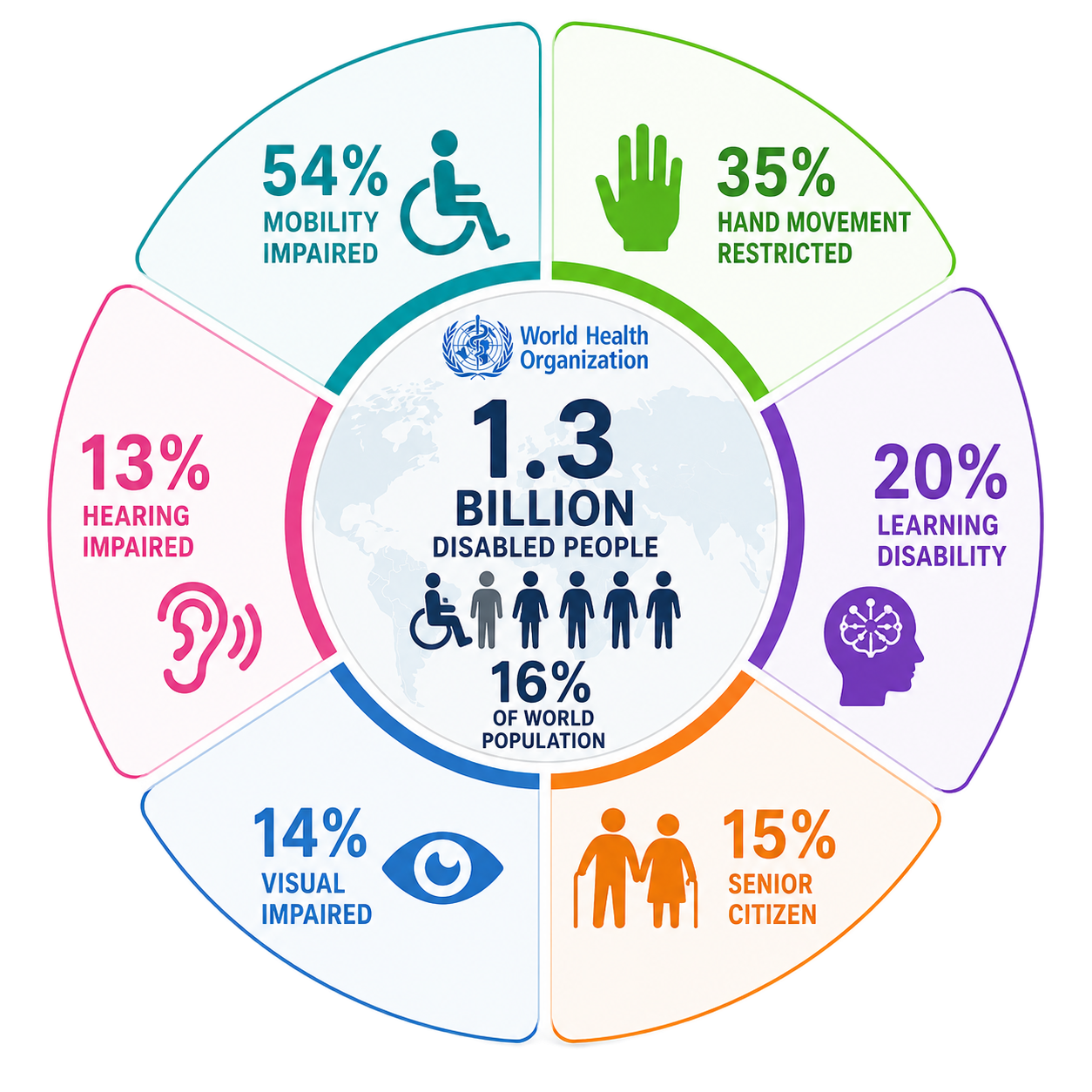
Technical barriers impact real people. Understanding the spectrum of disability is the first step toward universal design.
Visual Impairments
Includes blindness, low vision, and color blindness. Users rely on screen readers and high-contrast visuals to navigate digital spaces.
Hearing Loss
Impacts people globally who require captions and visual cues for any audio content or video material provided on your platforms.
Motor/Physical
Includes limited fine motor control or paralysis. Users often use switch devices, eye-tracking, or keyboard-only navigation.
Common Critical Failures
palette Low Color Contrast
Failed: WCAG 1.4.3
Why it is unacceptable:
Millions of users with low vision or color blindness cannot read text that blends into the background. It renders your site completely unusable and creates a technical barrier that excludes a significant demographic.
image_not_supported Missing Alt Text
Failed: WCAG 1.1.1
Why it is unacceptable:
Screen readers skip images without descriptions. This means blind users miss crucial context, product details, or navigation cues. "An image" is not information; context is access.
mouse Non-Keyboard Nav
Failed: WCAG 2.1.1
Why it is unacceptable:
Designing only for mouse interactions traps users who rely on keyboards, switches, or head-pointers. If you can't 'Tab' through it, it's a dead end for anyone with a motor disability.
How Our Service Can Help
Choose a stage from the AODA Shield deployment lifecycle below, or explore our full services.


Audit
Comprehensive scanning of DOM structure and accessibility markers.
Let Us Guide You arrow_forward
Remediate
Automated and manual code injections to fix non-compliant elements.
Connect with an Expert arrow_forward
Contact Us
Do you have a quick question? Send us a mail. We will guide you through.
Send us a mail arrow_forward